
Built for scale, trusted by developers

Developers supported

From solo builders to global products, teams ship voice on Speechmatics.

Uptime for API calls
A speech layer you can build a business on, in the cloud or on-prem.

Languages supported
Real-time transcription, plus batch transcription with automatic code-switching mid-sentence from Melia.

Questions answered
A community-first team, ready to answer questions at every stage of your work.
Get your first transcript
Stream audio and receive real-time transcripts using the real-time API. Start by generating your API key.
1# Install the speechmatics package using the command "pip install speechmatics-rt"
2
3#!/usr/bin/env python3
4"""Real-time transcription with microphone."""
5
6import asyncio
7import os
8from dotenv import load_dotenv
9from speechmatics.rt import (
10 AsyncClient,
11 ServerMessageType,
12 TranscriptionConfig,
13 TranscriptResult,
14 OperatingPoint,
15 AudioFormat,
16 AudioEncoding,
17 Microphone,
18 AuthenticationError,
19)
20
21load_dotenv()
22
23
24async def main():
25 api_key = os.getenv("SPEECHMATICS_API_KEY")
26
27 transcript_parts = []
28
29 audio_format = AudioFormat(
30 encoding=AudioEncoding.PCM_S16LE,
31 chunk_size=4096,
32 sample_rate=16000,
33 )
34
35 transcription_config = TranscriptionConfig(
36 language="en",
37 enable_partials=True,
38 operating_point=OperatingPoint.ENHANCED,
39 )
40
41 mic = Microphone(
42 sample_rate=audio_format.sample_rate,
43 chunk_size=audio_format.chunk_size,
44 )
45
46 if not mic.start():
47 print("PyAudio not installed. Install: pip install pyaudio")
48 return
49
50 try:
51 async with AsyncClient(api_key=api_key) as client:
52 @client.on(ServerMessageType.ADD_TRANSCRIPT)
53 def handle_final_transcript(message):
54 result = TranscriptResult.from_message(message)
55 transcript = result.metadata.transcript
56 if transcript:
57 print(f"[final]: {transcript}")
58 transcript_parts.append(transcript)
59
60 @client.on(ServerMessageType.ADD_PARTIAL_TRANSCRIPT)
61 def handle_partial_transcript(message):
62 result = TranscriptResult.from_message(message)
63 transcript = result.metadata.transcript
64 if transcript:
65 print(f"[partial]: {transcript}")
66
67 try:
68 print("Connected! Start speaking (Ctrl+C to stop)...\n")
69
70 await client.start_session(
71 transcription_config=transcription_config,
72 audio_format=audio_format,
73 )
74
75 while True:
76 frame = await mic.read(audio_format.chunk_size)
77 await client.send_audio(frame)
78
79 except KeyboardInterrupt:
80 pass
81 finally:
82 mic.stop()
83 print(f"\n\nFull transcript: {' '.join(transcript_parts)}")
84
85 except (AuthenticationError, ValueError) as e:
86 print(f"\nAuthentication Error: {e}")
87
88
89if __name__ == "__main__":
90 asyncio.run(main())
91 Wall of fame

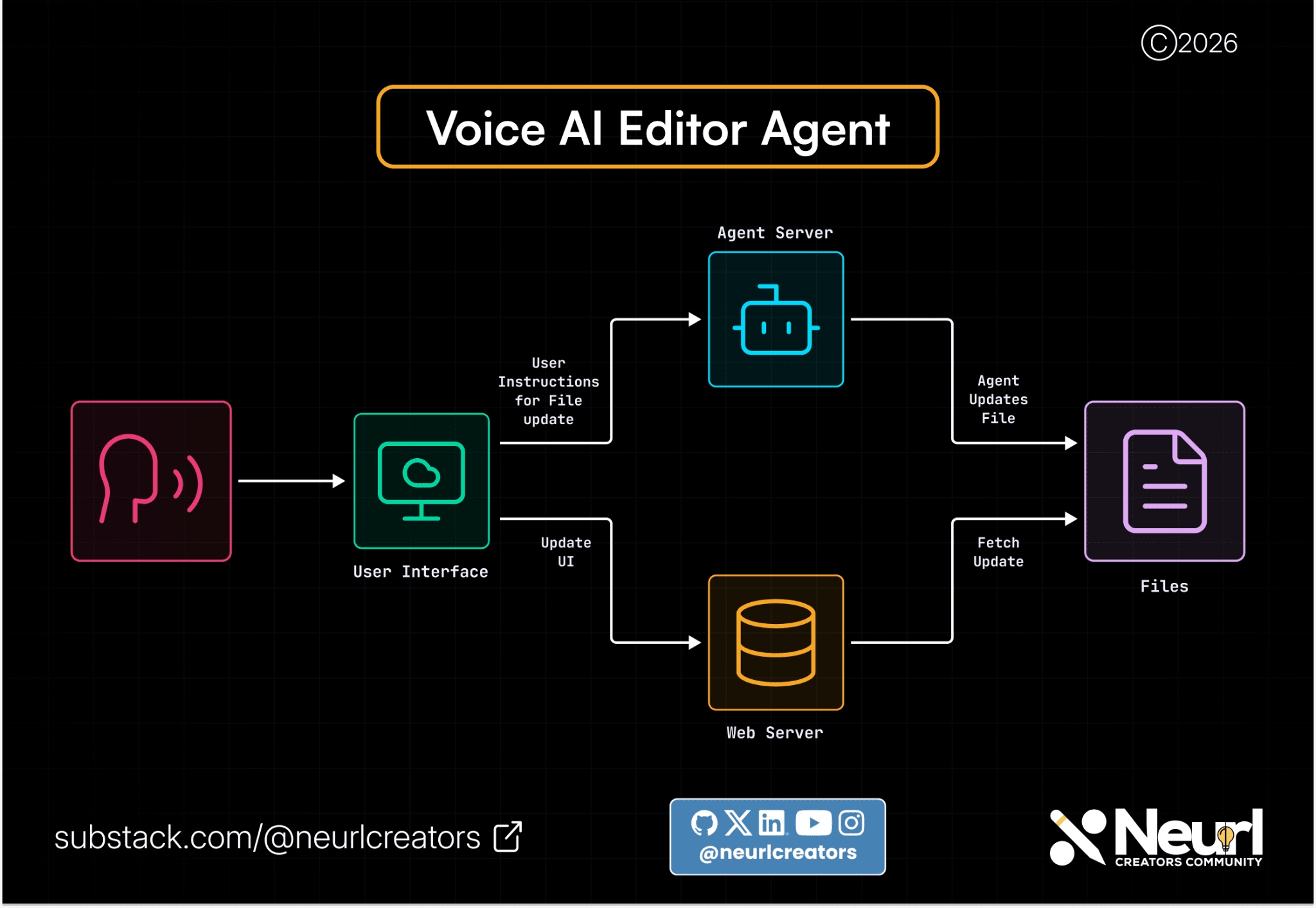
Building a Conversational AI Writing Partner with Speechmatics and LiveKit
A voice-native editor agent for reviewing and polishing blog posts, built with Speechmatics STT/TTS and LiveKit's real-time pipeline.
![[alt: Central figure with headphones and microphone, labeled "Edgar," on a network-themed background with blurred faces.]](/_next/image?url=https%3A%2F%2Fimages.ctfassets.net%2Fyze1aysi0225%2F5kt9daaTB1XXgYH7QWPCEm%2F45d99d70efa2bfdd0ace0c8e5e91141c%2FSpeaker-focus-edgar-wide-carousel.webp&w=3840&q=75)
Anyone Can Hijack Your Voice Agent (Here's the Fix)
Any voice near a voice agent can hijack it — Speaker Focus closes that gap with live speaker diarization, so you decide who drives the agent and who just gets heard.
![[alt: Livekit and Speechmatics partnership]](/_next/image?url=https%3A%2F%2Fimages.ctfassets.net%2Fyze1aysi0225%2F55uo621nIAzecVIcDsrrGX%2Fa81809b4dcf9acd1883ce628f8a10552%2FLiveKit-blog_assets-V1_-_Header_16-9.webp&w=3840&q=75)
Introducing real-time, speaker-aware Voice Agents with LiveKit + Speechmatics
Build real-time, speaker-aware Voice Agents with LiveKit + Speechmatics.
![[alt: The Pipecat logo]](/_next/image?url=https%3A%2F%2Fimages.ctfassets.net%2Fyze1aysi0225%2FpvtJ7dqMe5Kdfc6zSeyxI%2F173057fb186137baa7c5c1126e8e62da%2FSocial_sharing.png&w=3840&q=75)
Pipecat and Speechmatics: Building Voice Agents that know exactly 'Who' said 'What'
Build smarter voice agents on Pipecat with Speechmatics speech-to-text, now with powerful speaker diarization for real-world, multi-speaker conversations.
![[alt: Vapi integration launch blog]](/_next/image?url=https%3A%2F%2Fimages.ctfassets.net%2Fyze1aysi0225%2F4oh9lqHezPsnHJEdyeKLi2%2F1c6355f73f53d3d3154f6f04594b6993%2FVapi-blog_assets-V1_-_Header_16-9.webp&w=3840&q=75)
Vapi and Speechmatics: Build agents that understand every voice
Ship Voice AI agents that understand every voice in real-time, even in noisy, multi-speaker scenarios.
Create and explore
Speed up your learning with the collective wisdom of developers already building voice agents in the open. We believe the fastest way to learn is to build something real, then share what you found.Create and explore
Read the docs
Quickstarts, full API reference, and SDK guides for Python, JavaScript, .NET, Rust and integration guides. Everything you need to go from key to production.
Interact and be heard
Join the developers already building voice AI with Speechmatics. Get unblocked fast, share what you are shipping, and swap notes with people solving the same problems.Interact and be heard
Join the conversation
Start building with the speech layer made for voice agents.